

From an “Unsafe” Website to an Owned Technology Stack: Rebuilding, Migrating, and Operating the Research & Consulting Platform Website
Client A European research and consulting organization
Industry Research · Consulting
Role Independent Full-Stack Engineer — requirements, architecture, frontend, SEO, migration, deployment, operations, and cost optimization
Initial Production Delivery 1 week
Ongoing Evolution 2025 Q4 internal prototype → 2026-02 migration and SEO completion → 2026-08 production cutover and old origin shutdown → ongoing monthly maintenance
Stack Next.js 16 · React 19 · TypeScript · Tailwind CSS 4 · Nginx · PM2 · AWS Lightsail · Cloudflare
1. Overview
This project did not begin as a planned website redesign. It started as an urgent production issue with a hard delivery deadline.
The client’s existing website had begun displaying a browser “Not Secure” warning. For a research and policy institution serving academics, businesses, and public-sector audiences in Europe, this was not merely a technical defect. It directly affected institutional credibility.
The client had two immediate requirements:
- Resolve the problem and launch the rebuilt website within one week
- Make sure the new website could be properly crawled and indexed by Google
Once I inspected the existing site, it became clear that the problem extended far beyond SSL.
The website had been built on a domestic SaaS / CMS website builder. The client did not own a maintainable codebase. The exported site consisted of large amounts of static HTML, template CSS, inline scripts, and third-party assets, while already having live URLs and existing search visibility.
What began as an HTTPS fix therefore became a broader ownership migration:
Within a one-week initial delivery window, migrate a bilingual institutional website with existing URLs and search exposure from a vendor-dependent SaaS platform to a client-controlled Next.js stack, while restoring HTTPS, establishing crawlable SEO foundations, and deploying a production-ready environment.
After the initial launch, I continued maintaining the website monthly, handling SEO, content updates, infrastructure improvements, cost optimization, and urgent client requests. This later included migrating the production origin from EC2 to Lightsail and shutting down the old server.
Impact Snapshot
| Delivery | Migration | SEO / URL | Operations |
|---|---|---|---|
| 1-week initial launch | SaaS → owned Next.js stack | 38 sitemap URLs verified 200 | EC2 → Lightsail |
| HTTPS restored | EN / ES + responsive rebuild | 70+ legacy redirects | $33.18/mo (May–July average) → $1.76 in September; ~94.7% lower |
2. Client & Context
The client is a European research and consulting organization.
The website acts as an institutional and brand portal rather than a transactional product.
Its responsibilities include:
- Presenting the center’s positioning and research focus
- Showcasing researchers, consultants, publications, and policy work
- Publishing forums, lectures, activities, and videos
- Supporting both English and Spanish audiences
- Providing institutional contact points and credibility
The website therefore needed to be:
- Credible
- Stable
- Searchable
- Usable on mobile
- Compatible with historical links
- Maintainable over time
For the client, the website is a long-term institutional asset, not a one-off set of pages.
3. The Trigger: Why the Project Had to Move Immediately
3.1 The website was showing “Not Secure”
The immediate trigger was an HTTPS / SSL problem on the existing production website.
This created several risks:
- Reduced user trust
- Damage to institutional credibility
- Friction around contact and content discovery
- Poor technical conditions for search crawling and SEO
The client therefore needed a fast fix and wanted the replacement website to become discoverable by Google as soon as possible.
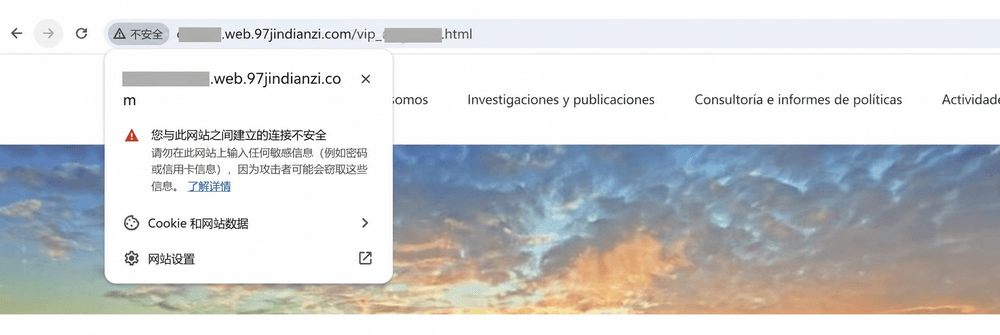
Figure: The legacy production state when I took over the project. The user-facing URL still exposed a third-party website-builder subdomain and CMS-style path, while Chrome explicitly warned that the connection was not secure. This was a key reason the engagement evolved from an SSL fix into a broader ownership migration.
3.2 One-week delivery changed the engineering approach
A normal website rebuild might follow:
Design → Development → Content Migration → Testing → SEO → Launch
This project did not have that timeline.
The first week required parallel work across:
- Legacy-site analysis
- Content migration
- New codebase setup
- Bilingual routing
- Technical SEO
- HTTPS
- DNS and domain configuration
- Production deployment
- Core-page validation
- Google crawl readiness
The objective was not to build the final perfect architecture in one week.
It was to create:
A secure, stable, crawlable, maintainable production baseline that could continue evolving after launch.
4. What I Found
| Problem | Business Impact |
|---|---|
| SaaS / CMS exported HTML with no independent repository | The client did not truly own or control the website |
| Large amounts of duplicated HTML | Small updates required manual edits across many pages |
| Broken or inconsistent HTTPS | Browser warnings reduced trust |
| No real responsive/mobile experience | Mobile visitors were effectively served the desktop layout, without responsive navigation, content hierarchy, team presentation, or contact UX |
| Inconsistent SEO metadata | Weak control over search snippets and page meaning |
| Missing canonical / hreflang structure | English and Spanish relationships were unclear |
| Images and fonts depended on external CDNs | Stability and asset ownership were limited |
| Legacy jQuery / CMS scripts | UI failures were difficult to debug |
CMS-style numeric and .html URLs |
Migration risked large-scale 404s |
| English and Spanish content were separated | Long-term content drift was likely |
| No standardized deployment or rollback process | Production maintenance depended on manual knowledge |
The old site could display content, but it was not a sustainable software system.
5. Goals & Requirements
5.1 Required within the first week
- Restore HTTPS and trusted access
- Launch the replacement website
- Make the website crawlable by Google
- Preserve existing branding and core content
- Keep English and Spanish versions functional
- Avoid critical 404s
- Preserve or redirect historical URLs
- Make the main site usable on mobile
5.2 Longer-term goals
- Fully remove dependence on the original SaaS platform
- Give the client ownership of code and deployment
- Centralize repeated content
- Establish complete technical SEO foundations
- Host core assets independently
- Support fast future updates
- Reduce infrastructure cost
- Maintain clear deployment and rollback procedures
6. Constraints
| Constraint | Engineering Impact |
|---|---|
| Only one week for the initial delivery | The rebuild had to be phased |
| No major visual redesign initially | Continuity mattered more than modernization |
| Existing search presence and URLs | Redirects and compatibility were required |
| English / Spanish bilingual site | Content and SEO relationships had to stay aligned |
| Legacy CMS HTML had to remain temporarily | Some contentHtml had to be preserved as a migration layer |
| Legacy CSS / JS could not be removed immediately | Isolation and gradual replacement were safer |
| European audience | Overseas availability and HTTPS reliability mattered |
| Baidu verification still needed | Multiple search-engine requirements had to coexist |
| No dedicated operations team | Deployment and rollback needed to remain simple |
| Frequent client updates | The architecture had to support fast, safe changes |
7. My Role
This was a single-owner full-stack delivery.
I handled:
- Requirement translation
- Legacy-site audit
- Information architecture
- Next.js architecture
- English / Spanish routing
- Content migration
- Frontend development
- Responsive implementation
- SEO
- Canonical / hreflang
- Sitemap / robots
- Historical URL redirects
- Cloudflare configuration
- HTTPS
- Nginx
- PM2
- AWS deployment
- DNS cutover
- Rollback planning
- Launch validation
- Ongoing maintenance
- Infrastructure cost optimization
- Fast-response client updates
The client mainly supplied brand assets, copy corrections, team information, content approval, and acceptance feedback.
Technical decisions, implementation, deployment, and ongoing operation were handled end to end by me.
8. Client Collaboration & Requirement Translation
A large part of the work involved turning non-technical business requests into concrete engineering tasks.
| Client Request | Engineering Translation |
|---|---|
| “Google needs to find the site” | Metadata, canonical, hreflang, sitemap, robots, status codes, crawl validation |
| “The new site should still look like us” | Preserve desktop visual continuity, phased migration, regression checking |
| “This professor’s title needs to be updated today” | Shared data source, bilingual synchronization, desktop/mobile consistency |
| “The browser cannot keep saying Not Secure” | TLS, Cloudflare, Origin CA, HTTPS redirects, certificate validation |
| “We need to own the website ourselves” | Independent repository, owned infrastructure, localized assets, documented operations |
| “This issue needs to be fixed quickly” | Small changes, quick verification, low-risk deployment |
This translation layer strongly influenced the final architecture.
9. Strategy: Stabilize First, Modernize Incrementally
The core strategy was:
Preserve → Stabilize → Migrate → Verify → Modernize
In practice:
- Preserve business continuity and visual familiarity
- Establish a controllable technical foundation
- Restore HTTPS, SEO, and production deployment
- Verify pages, URLs, and crawlability
- Modernize legacy architecture incrementally
Why not rewrite everything immediately?
Because the highest migration risks were not “messy code.”
They were:
- Missing content
- Broken historical URLs
- Incorrect bilingual mappings
- Crawl failures
- Visual regressions
- No rollback path
So I retained selected legacy HTML as a migration layer while introducing shared layouts, routes, and structured data.
10. Why Next.js
The project was no longer suitable for maintaining scattered static HTML, and moving to another closed website builder would have recreated the same ownership problem.
Next.js was a good fit because it supported:
- Shared layouts and reusable components
- Organized bilingual routing
- Centralized metadata, canonical, and hreflang
- Strong crawlability through SSR / SSG patterns
- Incremental migration from legacy HTML
- Self-hosting without SaaS lock-in
- Future CMS integration if needed
The goal was not “use Next.js.”
The goal was to create a maintainable technical foundation that the client could own and evolve.
11. Architecture
I gradually extracted repeated content into structured models.
SiteData
- Navigation
- Footer
- Logo
- Contact information
- Global content
PageData
- Title
- Description
- Keywords
- Banner
- Main content
- SEO information
English and Spanish were organized as parallel content structures rather than separate websites.
This made it possible to:
- Change an address once
- Keep team titles synchronized
- Unify navigation and footer content
- Centralize SEO information
- Reduce bilingual content drift
12. Frontend & Responsive Rebuild
The legacy site had no real responsive/mobile experience. Mobile visitors were effectively served the desktop layout, without a dedicated small-screen navigation system, content hierarchy, team presentation, or contact experience.
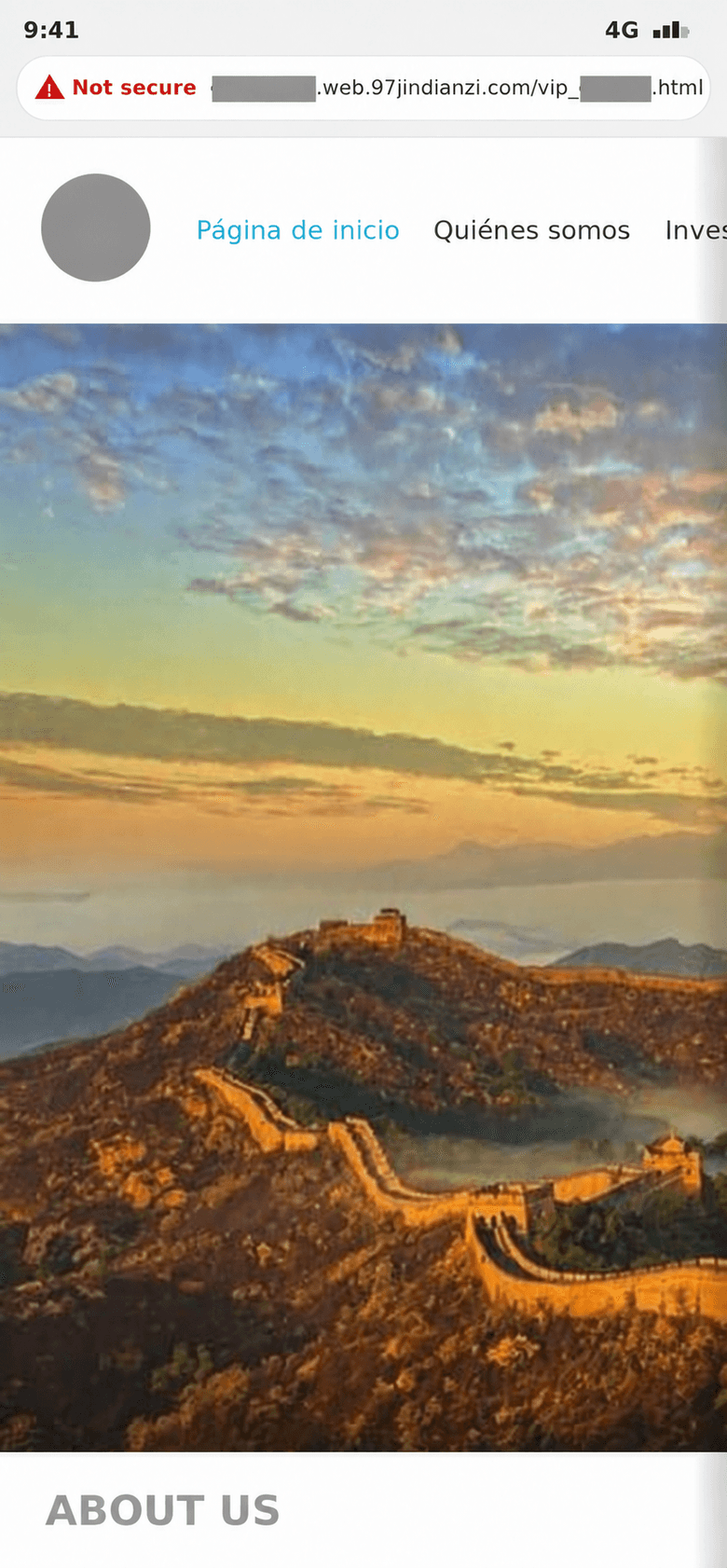
Figure: The legacy site had no real responsive/mobile experience. On a phone, visitors still got the desktop fixed-width canvas — navigation clipped, horizontal scrolling required — while the address bar exposed the third-party SaaS domain and a “Not secure” warning. Legacy mobile behavior reproduced locally from the historical source code without modifying its responsive behavior.
To improve mobile usability without introducing excessive launch risk, I rebuilt the primary sections progressively:
- Home
- Who We Are
- Research and Publications
- Consulting and Policy Reports
- Activities
- Contact Us
For screens ≤768px, I redesigned:
- Header navigation
- Hamburger menu
- Language switching
- Team cards
- Contact forms
- Footer
- Maps
- Content layout
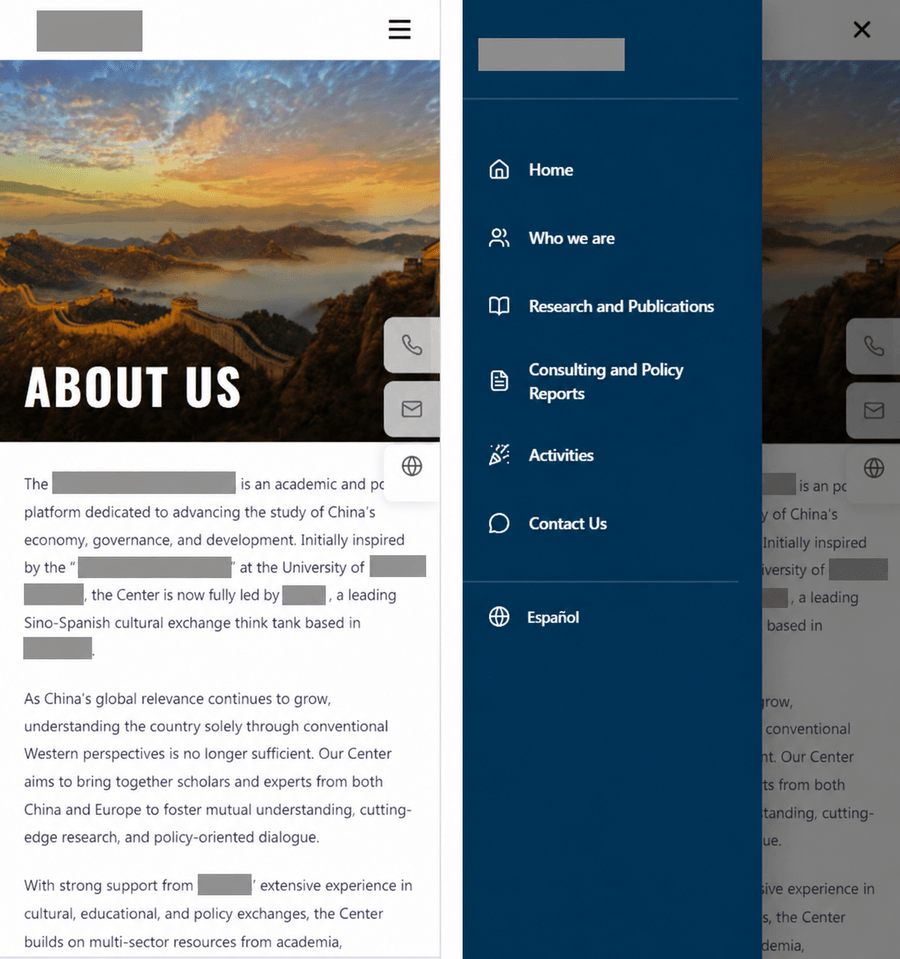
Figure: Current production on mobile. Left: the rebuilt home (dedicated header, hamburger, reflowed copy). Right: the navigation drawer, with primary sections and Español directly tappable.
Some complex pages temporarily used separate desktop and mobile structures:
.desktop-only
.mobile-only
This was not the cleanest theoretical architecture, but it significantly reduced visual regression risk during migration.
13. SEO Was Part of Launch Readiness
SEO was not treated as a post-launch marketing task.
Because Google indexing was part of the client’s initial requirement, technical SEO was part of launch readiness.
The first phase included:
- Page titles
- Descriptions
- Keywords
- Canonical URLs
- hreflang
- Open Graph
- Twitter metadata
robots.txtsitemap.xml- Dynamic
<html lang> - Baidu verification meta
- Historical URL redirects
- HTTP status validation
The production sitemap eventually contained 38 URLs, all verified to return 200.
14. URL Migration & Compatibility
The legacy site used CMS-style URLs such as:
/bk_*/doc_*.html- Numeric paths
- Mixed-case paths
These URLs could already exist in:
- Search indexes
- External links
- Browser bookmarks
- Archived materials
- Client emails
I therefore created 70+ permanent redirect rules mapping legacy URLs to new semantic routes.
For invalid requests such as:
/dom/.php/adminwp-*
middleware returns real 404 responses rather than soft redirects.
I also explicitly tested for case-related redirect loops in Spanish routes.
15. Asset Ownership & Performance
The original site depended on several third-party asset hosts.
I progressively migrated critical assets to the client-controlled website:
- Logo
- Homepage hero images
- Banners
- Team images
- Section images
- Map assets
- Core visual resources
I also introduced:
- WebP conversion
- Image compression
- Lazy loading
- Banner preload
- Critical CSS optimization
The purpose was not only speed.
It was also to ensure the client owned the assets required to run the website.
16. Production Infrastructure
The production path became:
flowchart LR
  V["Visitor"] --> CF["Cloudflare"]
  CF --> ORIGIN

  subgraph ORIGIN["AWS Lightsail"]
    direction LR
    NX["Nginx"] --> PM["PM2"] --> NJ["Next.js"]
  end
Figure: Production request path. Cloudflare sits at the edge for CDN / TLS / DNS; the Lightsail origin runs Nginx → PM2 → Next.js.
Key configuration included:
- Cloudflare proxy
- Full (strict)
- Cloudflare Origin CA
- Always Use HTTPS
- HSTS
- TLS ≥ 1.2
- Nginx reverse proxy
- PM2 process management
- AWS Lightsail static IP
This separated CDN, TLS, DNS, origin, and Node.js process responsibilities.
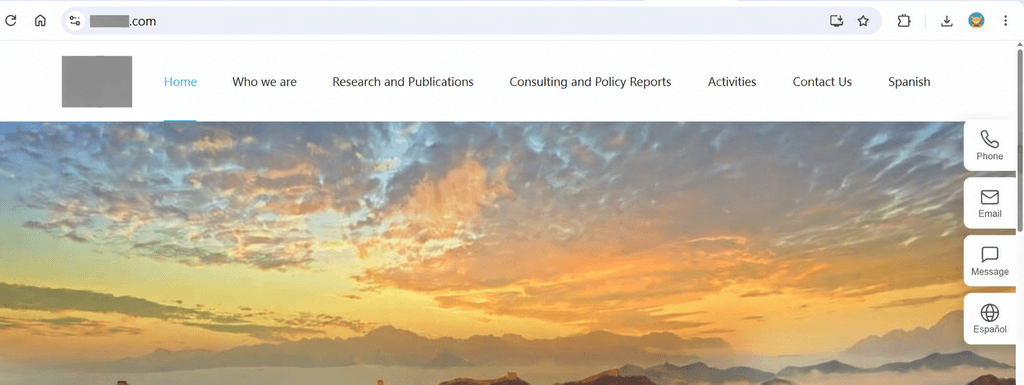
Figure: The current production site running on its own production domain and maintained on the client-controlled stack.
17. Deployment & Cutover
The old production server was not shut down immediately.
The cutover process was:
- Run the new website on an independent origin
- Validate critical pages
- Validate sitemap
- Validate robots
- Validate HTTPS
- Validate redirects
- Validate bilingual routes
- Point Cloudflare DNS to the new origin
- Keep the old EC2 instance temporarily as a rollback option
- Shut it down only after the new origin proved stable
The principle was:
DNS cutover and application deployment are different risk layers and should not be treated as one irreversible event.
In August 2026, the production domain was fully moved to Lightsail, and the old EC2 origin was shut down after stability was confirmed.
18. Launch Validation & Production Checklist
I did not treat “the homepage loads” as sufficient launch validation.
Pages & HTTP
- Main pages return 200
- English and Spanish pages are reachable
- All sitemap URLs are reachable
- Historical URLs redirect correctly
- No redirect loops
- Invalid paths return real 404s
- Critical static assets load successfully
SEO
- Titles and descriptions exist
- Canonical URLs are correct
- hreflang mappings are correct
<html lang>matches the routerobots.txtis accessiblesitemap.xmlis accessible- Open Graph metadata is present
- Baidu verification meta is placed in
<head>
HTTPS / Infrastructure
- No browser security warning
- HTTP redirects to HTTPS
- Cloudflare Full (strict) works
- Origin CA is valid
- Nginx reverse proxy works
- PM2 processes are healthy
- Direct-origin access works
- DNS resolves to the intended origin
Responsive / Content
- Mobile navigation works
- Team cards remain readable
- Contact forms are usable
- Map fallbacks exist
- English / Spanish content is aligned
- Shared information remains consistent
19. Challenges & Debugging
19.1 HTTPS was only the visible symptom
The original request looked like a certificate problem.
The deeper issue was lack of ownership and maintainability.
Fixing only SSL would have left the client dependent on the same SaaS platform.
19.2 Redirect case sensitivity created loop risk
Legacy CMS paths and Next.js redirect behavior could cause valid new routes to re-match old rules.
This required explicit redirect-chain testing rather than only visual QA.
19.3 Legacy HTML could not be removed immediately
Some pages still depended on large legacy HTML, CSS, and JavaScript bundles.
A full rewrite would have increased one-week delivery risk, so I used a staged migration approach.
19.4 Third-party maps and media behaved differently across environments
Some iframe and external-media integrations were inconsistent on mobile, in mainland China, or across browsers.
Fallbacks and local asset strategies were added where needed.
19.5 DNS cutover required real-world validation
A saved DNS setting does not mean every access path behaves correctly immediately.
Post-cutover checks included:
- Resolution
- Proxy status
- HTTPS
- Mainland / overseas access
- Rollback readiness
20. Security & Operational Boundaries
This was not a high-risk transactional system, but it still needed a basic production security baseline.
That included:
- Site-wide HTTPS
- TLS ≥ 1.2
- HSTS
- Cloudflare proxy
- Origin CA
- Real 404s for invalid
/admin,.php, andwp-*paths - No unnecessary CMS-style exposure
- Clear origin / public access boundaries
- Version-controlled updates and repeatable deployment
The goal was not to over-engineer security, but to reduce common legacy-site exposure and configuration drift.
21. Cost Optimization
After the site stabilized, I continued performing infrastructure and cost reviews.
The early environment used EC2, but for a mostly institutional content website, the ongoing EC2 cost was not justified.
I therefore migrated production to AWS Lightsail.
The migration included:
- Provisioning a Lightsail instance
- Assigning a static IP
- Deploying Next.js
- Configuring PM2
- Configuring Nginx
- Reconfiguring Cloudflare origin HTTPS
- Testing domestic and overseas access
- Updating DNS
- Keeping EC2 available for rollback
- Shutting down EC2 after stability was confirmed
- Releasing unused resources
The objective was:
Reduce ongoing infrastructure cost without reducing reliability.
The savings were progressive rather than the result of a single cutover event.
The AWS billing figures were $34.44 in May, $33.78 in June, and $31.32 in July 2026, averaging $33.18/month. Costs fell to $22.96 in August, a transition month when some legacy services were still active. After those resources were decommissioned, the complete September billing month came to $1.76, approximately 94.7% lower than the May–July average.
As of this October 16, 2026 update, the screenshot shows $1.05 for October, marked as a partial month; it is not a final monthly cost. The reduction compares only the AWS charges shown in the billing screenshots. It does not represent total ownership cost including domains, other services, and maintenance labor, or guarantee a fixed cost in future months.
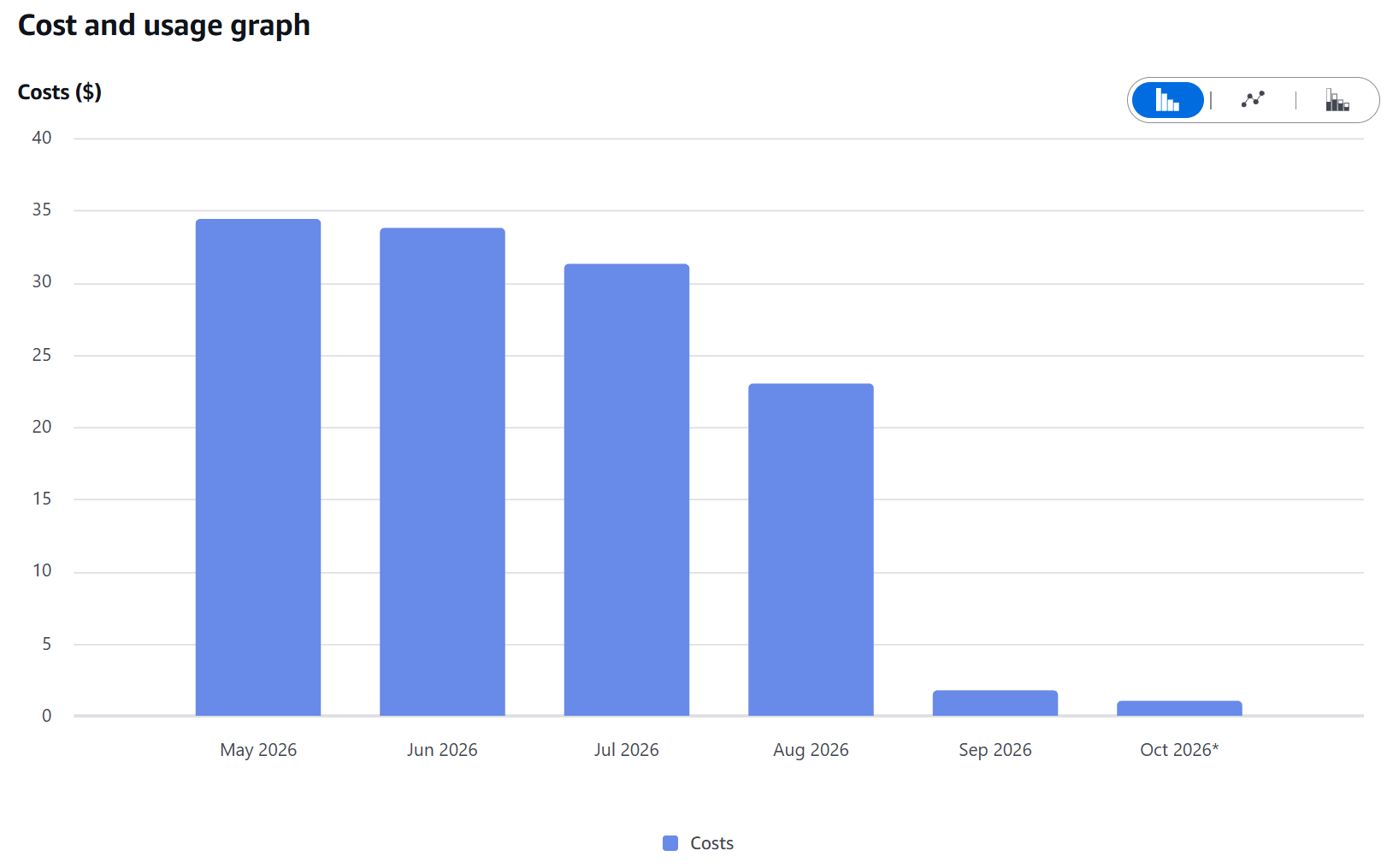
Figure: Monthly AWS cost trend. AWS charges from May through October 2026. August was a transition month; the complete September month totaled $1.76. October is a partial month.
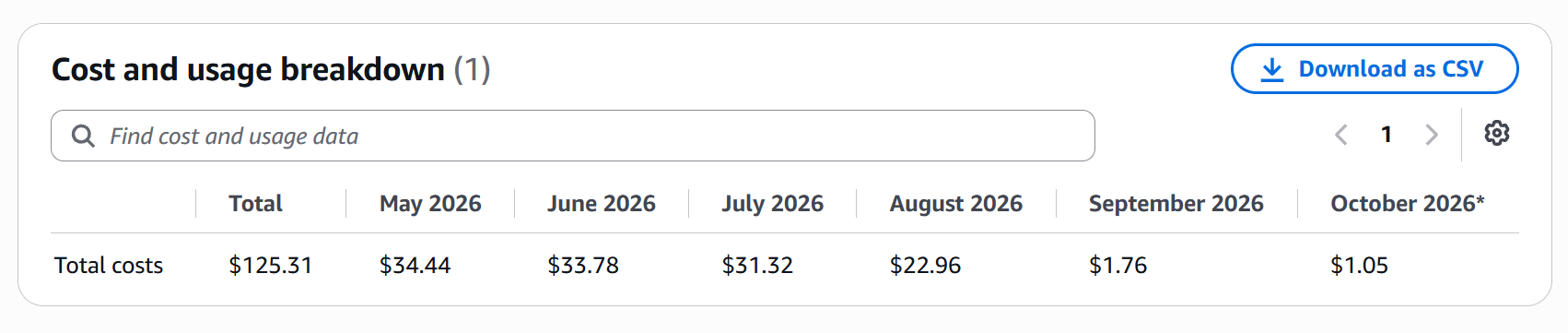
Figure: Exact monthly billing values used as supporting evidence rather than estimated savings.
Monthly maintenance also includes checking:
- AWS resource usage
- Idle instances or IPs
- Cloudflare configuration
- Traffic and asset anomalies
- Video / media cost
- Domain and certificate status
22. Ongoing Maintenance & Fast Response
The engagement continued after launch.
Content and business updates
Typical requests include:
- Professor / advisor title updates
- Team changes
- Activity updates
- New research content
- Address and contact updates
- Video content
- Copy corrections
Because the site now uses a structured codebase, updates can be applied centrally and kept consistent across languages and devices.
Fast response
Many client requests are time-sensitive.
Operational goals therefore include:
- Fast diagnosis
- Fast implementation
- Fast verification
- Fast deployment
- Avoiding SEO or layout regressions
Over time, this response capability became part of the system design itself.
Monthly operations
Regular checks include:
- Critical page availability
- Sitemap
- Redirects
- Certificates
- Cloudflare
- AWS instance status
- DNS
- Video / media resources
- 404s
- Page-loading anomalies
- Client-reported issues
23. Versioning, Recovery & Operational Resilience
The project uses version control and explicit deployment procedures to avoid a “works only on the developer’s machine” situation.
Key principles:
- All code changes are versioned
- Production configuration is separated from application logic
- Deployments retain rollback options
- DNS cutover is decoupled from application release
- Major infrastructure changes keep the old environment temporarily available
- PM2 / Nginx configuration is documented
- Changelogs and operational notes preserve key production decisions
The objective is not enterprise-scale disaster recovery.
It is a practical recovery baseline suitable for a small institutional website.
24. Accessibility & Quality Baseline
The project was not scoped as a formal WCAG certification effort, but basic accessibility and usability considerations were included during the responsive rebuild.
These included:
- Reasonable image alt text where applicable
- Clickable mobile interaction targets
- Usable navigation and language switching
- Readable form controls
- Content structures that are not purely visual
- Clickable contact details
- Prevention of horizontal overflow on smaller screens
The focus was practical usability rather than claiming formal accessibility compliance.
25. Outcomes
25.1 Recovered from an unsafe production state
- HTTPS / SSL restored
- Browser security warnings removed
- Standard production environment established
- Full-site HTTPS through Cloudflare
25.2 Initial production version delivered within one week
The first delivery included:
- New site framework
- Core content migration
- Bilingual structure
- HTTPS
- Technical SEO foundation
- Google crawl readiness
- Production deployment
- Core-page launch
25.3 Moved from SaaS dependency to an owned stack
The client now controls:
- The codebase
- The server
- The domain and DNS
- The website assets
- The long-term architecture
25.4 Preserved SEO and historical URLs
- Metadata
- Canonical
- hreflang
- Sitemap
- Robots
- Open Graph
- 70+ redirects
- 38 production sitemap URLs verified as 200
25.5 Improved mobile usability
Core pages now have dedicated responsive layouts rather than simply shrinking desktop pages.
25.6 Reduced operational cost
The EC2 → Lightsail migration:
- Preserved production reliability
- Reduced ongoing cloud cost
- Simplified infrastructure
25.7 Improved client response speed
Centralized content made it faster to update:
- Team titles
- Addresses
- Contact information
- Activities
- Bilingual content
26. Timeline
Phase 0 — Emergency Trigger
- Browser showed “Not Secure”
- Client requested a one-week fix
- Google crawlability was required
Phase 1 — One-Week Production Rebuild
- Audited legacy SaaS / CMS pages
- Created Next.js project
- Migrated core pages
- Built bilingual structure
- Configured HTTPS
- Established technical SEO
- Added sitemap / robots
- Deployed production environment
- Launched initial version
Phase 2 — Structural Modernization
- Extracted SiteData / PageData
- Added shared layouts
- Rebuilt mobile experience
- Componentized pages
- Localized assets
- Expanded SEO
- Built redirect matrix
- Isolated legacy CSS / JS
Phase 3 — Production Hardening
- Nginx
- PM2
- Cloudflare Full (strict)
- Origin CA
- HSTS
- TLS
- 404 handling
- Performance work
- Link and page validation
Phase 4 — Cost Optimization & Infrastructure Migration
- EC2 → Lightsail
- Static IP
- New-origin deployment
- Cloudflare cutover
- Rollback window
- EC2 shutdown
- Old resource cleanup
Phase 5 — Ongoing Maintenance
- Monthly operations
- Cost reviews
- SEO checks
- Content updates
- Urgent client requests
- Fast releases
- Stability maintenance
27. Engineering Decisions
27.1 I did not delay launch for a “perfect rewrite”
The first phase prioritized:
- Security
- Availability
- Crawlability
- Content completeness
- URL continuity
over architectural purity.
27.2 SEO was not treated as a later marketing task
Because indexing was part of the launch requirement, technical SEO was part of launch readiness.
27.3 Historical URLs were preserved
Better new URLs did not justify breaking existing search and external links.
27.4 The old server stayed available during cutover
EC2 remained available as a rollback target until the new origin proved stable.
27.5 Infrastructure cost was revisited after stabilization
Once the site was stable, the production environment was right-sized to Lightsail instead of keeping a more expensive early setup indefinitely.
28. Learnings
28.1 Real-world modernization is rarely a clean rewrite
The priorities in production are:
- Continuity
- Rollback
- Verification
- Risk control
not simply architectural elegance.
28.2 Technical SEO is engineering work
Canonical, hreflang, redirects, status codes, robots, and sitemap behavior are all implementation concerns.
28.3 Infrastructure should match business scale
The most sophisticated cloud architecture is not always the best one.
For an institutional website:
- Stability
- Simplicity
- Maintainability
- Reasonable cost
matter more than unnecessary complexity.
28.4 Fast response can be a design requirement
If a client frequently needs urgent updates, safe update speed should influence the architecture itself.
29. Remaining Work / Next
The production migration is complete, but further modernization remains possible:
- Remove more legacy HTML
- Fully componentize additional pages
- Further unify the content model
- Add a lightweight CMS if needed
- Expand deployment automation
- Add stronger uptime / error monitoring
- Continue optimizing media delivery
- Improve accessibility further
These were intentionally not treated as launch blockers.
30. Final Result
The project transformed a website that was:
- Showing a browser security warning
- Dependent on a third-party SaaS builder
- Missing a maintainable codebase
- No real responsive/mobile experience
- Incomplete in technical SEO
- Dependent on external assets
into a long-term production system with:
- Complete HTTPS
- An owned Next.js codebase
- English / Spanish support
- Google crawlability
- Historical URL compatibility
- Cloudflare + AWS production hosting
- Fast content updates
- Ongoing maintenance
- Controlled infrastructure cost
I turned an urgent HTTPS and indexing problem into a long-term website ownership migration — rebuilding a vendor-dependent institutional site into a production-ready Next.js system that the client could actually control, maintain, and evolve.