

ChronoNav: Turning a Long-Chat Navigation Problem into a Published Gemini Extension
Project ChronoNav — Timeline for Gemini
Type Independent product · Chrome extension
Role Sole builder: product decisions, interaction design, development, privacy documentation, store release, and launch review
Timeline About one week for the first release; published in July 2026, with ongoing maintenance
Stack JavaScript · CSS · Chrome Manifest V3
Links Chrome Web Store · GitHub
1. Overview
ChronoNav grew out of two recurring problems in my own use of Gemini. Once a conversation reached dozens of turns, finding an earlier message became tedious. When I returned hours later, the model also did not necessarily have enough information to tell how much time had passed.
I built a Chrome extension to address both. It adds a clickable conversation timeline to the right side of Gemini, alongside an optional Time Context feature. When a user enables it, new messages include the local time and numeric UTC offset, giving the model an explicit reference for time-related questions.
The first release took about a week and went live on the Chrome Web Store in July 2026. That work covered the extension itself, English and Chinese interfaces, permission and privacy explanations, store assets, and packaging. After launch, I tried X, Reddit, and Product Hunt, then adjusted the time I spent on promotion based on the results.
| Delivery | User experience | Data handling | Later result |
|---|---|---|---|
| First release built and published in about a week | Message jumps, scroll tracking, and turn-by-turn navigation | Local processing, no usage tracking | 101 recorded install events by September 15, 2026 |
2. Defining the Scope from a Personal Problem
The project started with my own workflow rather than formal user research. I was the first user: while debugging, writing, or discussing an implementation in Gemini, I often needed to revisit an earlier requirement.
For example, a debugging conversation might begin with “keep the interface unchanged,” continue with a pasted error log, and then move into a proposed implementation. To check the proposal, I need to return to both the original constraint and the log. They are still in the thread, but finding them means scrolling back through everything in between. Keyword search has limits too: I may remember the discussion without remembering the exact wording.
That gave the first version a clear objective: help users return to one of their earlier messages without leaving the current conversation.
A browser extension fit the task. It could sit alongside Gemini without requiring a chat export or a separate application. To keep development and maintenance manageable as a solo project, I limited support to the Gemini web app. Other chat platforms, folders, and automatic summaries stayed outside the first release.
Those choices also defined the limits. The timeline organizes messages already loaded on the page; it does not expand the model’s context window. For particularly long projects, starting a new chat with a summary may still be necessary. People raised that point in community discussions after launch, which helped me describe the product’s purpose more precisely.
3. Interaction Design: Finding a Message Without Interrupting the Conversation
Build the timeline around the user’s own messages
The things I usually need to recover are my questions, source material, and constraints. The timeline therefore lists user messages, each with a short text preview.
Including every model response would make the sidebar much denser. Using prompts as entry points lets someone find “what I asked at that point,” then read the corresponding answer in the main conversation.
Clicking a node smoothly scrolls to its message. Scrolling through the conversation manually highlights the current turn in the sidebar. Up and down arrows move between adjacent messages, making it easier to compare nearby turns.
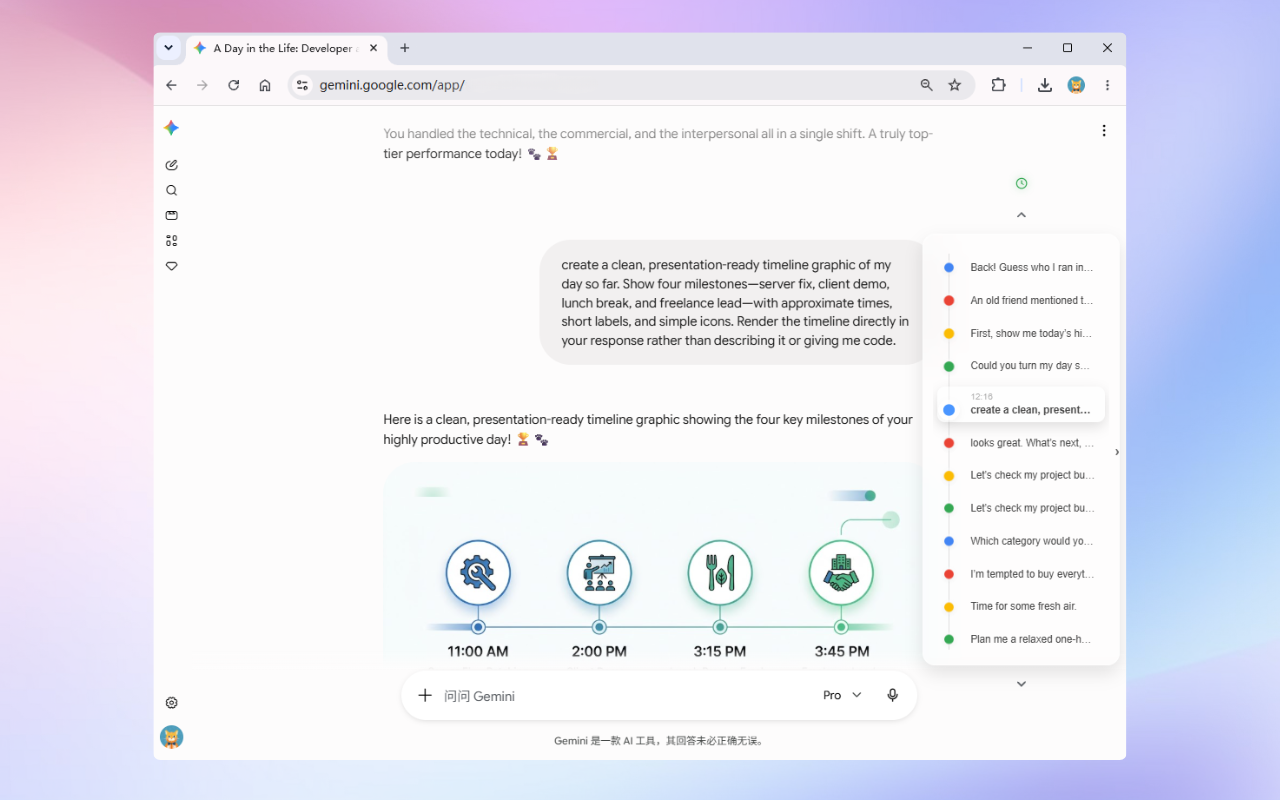
The sidebar lists the user’s messages. Clicking a node returns to that turn; scrolling the conversation updates the highlighted position.
Keep navigation available without taking over the page
A permanently expanded sidebar would take space away from the conversation. When idle, the timeline collapses into a narrow column of colored dots at the right edge. Hovering expands the text, and the styling follows Gemini’s light or dark theme.
Keyboard users need the same access. The sidebar expands when focus enters it, nodes and arrows have accessible names, and the region uses navigation semantics.
There is no account setup. Users can install the extension, refresh Gemini, and start navigating without enabling Time Context first.
4. Time Context: Designing the Feature and the Choice Together
Time Context adds a prefix like this to an outgoing Gemini message:
[System Time: 2026-06-18 21:34 +08:00]
That gives the model an explicit local time reference. It also changes the prompt the user sends, so the controls, explanation, and data handling needed to be part of the feature from the start.
I implemented it with these rules:
- It stays off until the user enables it.
- The first-use notice explains its purpose and offers the choice to keep it off.
- The extension popup and sidebar clock control the same setting.
- Minute precision is the default, with seconds available as an option. Only the timestamp and numeric UTC offset are added.
- Turning it off stops future additions and hides time information in the sidebar. Navigation continues working.
The page can hide the prefix to keep messages readable, but that timestamp is still sent to Google and may be stored. Turning the feature off does not remove timestamps sent earlier. The privacy explanation makes that distinction explicit: hiding something in the interface does not mean it was never transmitted.
The two features can therefore be used independently. Someone can use ChronoNav entirely for navigation and enable Time Context only when they want to provide that information to Gemini.
5. Engineering: Working with a Page I Do Not Control
ChronoNav uses plain JavaScript and CSS, with no separate backend or build step. The implementation has three main responsibilities:
| Part | Responsibility |
|---|---|
| Content script | Read loaded user messages, build the timeline, handle jumps and scroll highlighting, and synchronize settings |
| Script in the page context | Add time to eligible Fetch / XHR requests when Time Context is enabled |
| Extension popup | Explain the feature, expose the toggle and precision setting, and save preferences locally |
The main challenge is that the extension runs inside a page I do not control. Gemini loads and rebuilds content dynamically. A message node found during one scan may no longer exist during the next.
Restore timeline information after a render
When the page replaces a DOM node, metadata attached only to that node can be lost. The implementation combines page-change observation, message identification, and a metadata cache to recover previously recorded information during later scans.
Some historical messages have no ChronoNav timestamp at all—for example, messages sent before the extension was installed. Navigation and timestamp parsing are handled separately, so those messages still keep their timeline entries and previews.
Prevent highlighting from jumping during navigation
Clicking a distant node starts a smooth scroll past several other messages. If highlighting followed only what was currently visible, the sidebar would keep switching to intermediate nodes along the way.
After a click, the implementation briefly holds the selected target before returning to normal scroll tracking. This distinguishes the destination the user chose from the messages the page happens to pass during the animation.
Leave requests unchanged until settings are ready
The content script and page script can load in different orders. Time injection starts disabled and only becomes active after settings arrive. A readiness event lets the scripts synchronize without relying on one loading first.
Request handling is also conservative, avoiding changes to attachments, binary content, or payloads it cannot safely identify. Preserving normal message sending takes priority over adding time information. Compatibility still needs to be checked when Gemini changes its page or request structure.
6. From a Local Tool to an Installable Product
Getting the extension to work in my own browser was only part of shipping it. Someone encountering it for the first time needs to understand what it reads, what it sends, and why it needs its permissions.
ChronoNav requests access only to Gemini and the storage permission needed for local preferences. Navigation content is processed locally; I do not receive users’ conversations. There are no accounts, ads, or usage analytics. The source is public, and the privacy policy and store description reflect those behaviors.
Release work also included English and Chinese interfaces, screenshots, permission justifications, and a package containing only runtime files. Publishing to the store made the extension available through a normal installation flow, without asking users to load the source manually.
Choosing not to track usage has a cost. I cannot directly see how often people use navigation or how many enable Time Context. Later decisions rely on store data, feedback, and my own use of the product. That is a limitation I accepted as part of keeping the tool local.
7. Launch Results and Changes to Promotion
After publishing, I tried several ways to help people discover the extension.
| Channel | What happened | What I took from it |
|---|---|---|
| X | With no existing audience, posts received single-digit views | I stopped treating standalone launch posts as a main acquisition channel |
| Two posts received roughly 4,100 combined views and prompted discussion of the underlying problems | The discussion was useful, but post views could not be treated as store visits | |
| Product Hunt | The prepared launch finished with 0 points and 0 external comments | It did not generate the engagement I had hoped for; I did not invest in another launch |
On Reddit, people described similar difficulties with finding earlier messages and interpreting time in long conversations. That suggested the problems extended beyond my own workflow, but did not establish how many people would use the extension regularly.
The store records provided a more concrete view of visits and installs:
| Historical snapshot | Recorded result |
|---|---|
| July 26, 2026 | 59 store visits, 25 install events, and one five-star rating |
| September 15, 2026 | 101 cumulative install events |
Dividing 25 by 59 gives roughly 42%. That prompted me to reconsider the time I was spending on store copy. Very few people were reaching the listing, and repeated rewrites could not solve limited exposure. With only dozens of visits, it was also difficult to tell whether any particular copy change helped.
I stopped active promotion on July 26. The extension remained published, and later records showed that organic store traffic continued to bring installs. By September, the recorded total had passed 100.
Data note: These figures come from saved historical store dashboard records. Install events may include reinstalls and do not represent unique or active users. Visit and install reports may use different reporting windows or update schedules, so the 42% ratio is only a rough reference. One five-star rating is an early positive signal, not a measure of overall satisfaction.
8. Lessons and Next Steps
Look at existing products earlier
I built first and examined similar extensions seriously only after launch. That made it clear that timeline navigation already had alternatives. Having a timeline alone was not enough to explain why someone should choose ChronoNav.
Optional time context, a restrained interface, and explicit data handling are differences worth investigating further. Next time, I would try existing products and read user reviews before deciding where to spend development time.
In the product description, I chose to explain navigation first, then introduce Time Context. That gives the reader a straightforward way to understand the product, but I have not established that the order improves installs. Total installs also cannot tell me which feature people value most.
Set a new goal when the project enters a new phase
The original goal was to finish a product and publish it. After launch, I began wanting it to grow without defining how much time to spend on promotion or what result to expect.
The next phase needs its own goal: find out whether the problem is common, reach the first regular users, or increase exposure. Each requires different evidence. Daily install counts cannot answer all three.
Address the problems already observed
The current backlog includes timestamps occasionally influencing Gemini’s generated conversation titles, missing times on some entries, and a brief alignment shift during the initial render.
The next step is to test moving the time from a prefix to a short suffix, checking both title quality and whether Gemini still interprets the time correctly. Timestamp parsing and initial layout will follow. These changes remain planned work and still need implementation and validation.
ChronoNav turned a problem in my own workflow into a publicly installable product with a defined purpose. I handled the work from feature decisions through release, then learned how to interpret the early results and adjust my effort. Continued installs after promotion stopped are the clearest external result so far. The next useful questions are how those people use the extension, and what makes them keep it or leave.
Project sources: README, launch retrospective, historical case study and metrics, known issues, and the current source code.